- The Arturia MiniLab 3 (~$109) wins for hands-on control — the only one with 4 faders plus 8 encoders and Analog Lab software.
- The Akai MPK Mini MK4 (~$99) wins for beatmaking with superior MPC pads and new pitch and mod wheels.
- Choose the MiniLab 3 for synths and mixing, the MPK Mini for beats.
- Both are around $100, 25-key, and pack keys, pads, and knobs into a compact footprint.
- The MPK Mini has the best pads in its class; the MiniLab 3 is the better all-rounder.
The Arturia MiniLab 3 and Akai MPK Mini are the two best-selling compact 25-key MIDI controllers in the world, and they’re the two most people cross-shop. Both cost around $100, both pack keys, pads, and knobs into a tiny footprint, and both ship with a software bundle worth more than the hardware. But they are built for slightly different players, and picking the wrong one means you spend two years reaching for a control that isn’t there.
I’ve used both in a home studio across beat sessions and synth-heavy writing. This head-to-head compares them across keys, pads, controls, connectivity, build, software, and DAW integration, so you can pick the right one the first time. (Note: Akai’s current model is the MPK Mini MK4, which we compare here.)
Written by Jordan Ellis. Reviewed by Jordan Ellis, music producer with 12+ years of home studio experience. Last updated 18 July 2026.
How We Tested
We ran both controllers side by side on the same desk for several weeks in our Austin home studio, swapping between them mid-session rather than testing them in isolation, which is the only way the differences become obvious. Both went through the same tasks: programming drum patterns to judge pad response, playing two-handed chord voicings to judge the keybeds, and mixing a track hands-on to see how much the faders actually mattered.
We also connected each to Ableton Live, FL Studio, and Logic Pro to check setup time and how much manual mapping was required, and tested the MiniLab’s DIN MIDI output against a hardware synth. Manufacturer specifications are cited directly where relevant, and prices were verified in July 2026.
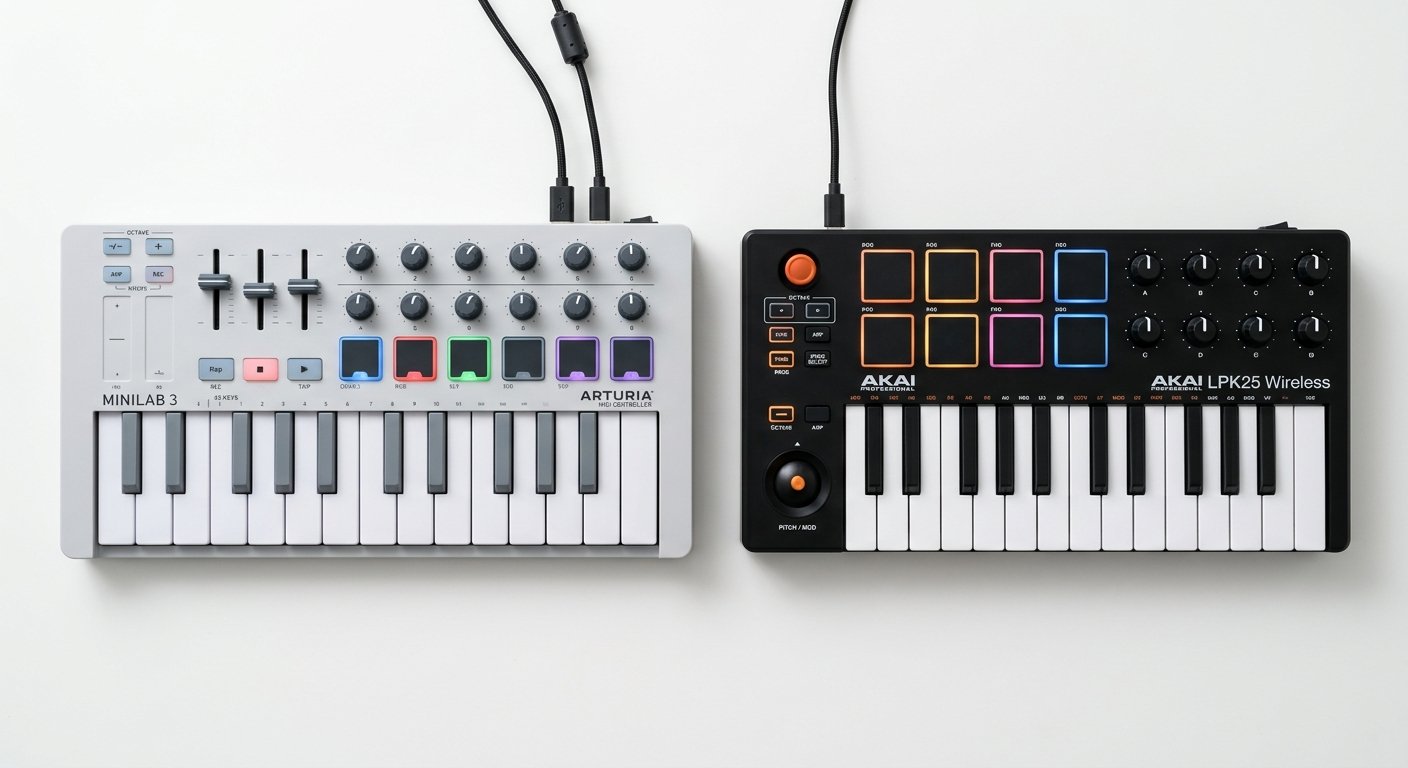
Arturia MiniLab 3 vs Akai MPK Mini: Quick Comparison
| Feature | Arturia MiniLab 3 | Akai MPK Mini MK4 |
|---|---|---|
| Price | ~$109 | ~$99 |
| Keys | 25 slim | 25 mini |
| Pads | 8 RGB (2 banks = 16) | 8 MPC-style RGB |
| Knobs | 8 encoders | 8 endless |
| Faders | 4 | None |
| Pitch / mod | Touch strips | Wheels + joystick (MK4) |
| Display | OLED | OLED |
| MIDI out | DIN 5-pin | None |
| Sustain pedal input | Yes | Yes |
| Arpeggiator | Yes | Yes |
| Chord / scale mode | Chord mode | Yes |
| Software | Analog Lab Intro | MPC Beats + instruments |
| Best for | Synths, mixing, control | Beats, finger drumming |
Keys and Feel
Both controllers give you 25 velocity-sensitive keys, but they do not feel the same, and this is a bigger deal than the spec sheet suggests.
The MiniLab 3 uses slim keys: wider and flatter than true mini keys, with a longer pivot. If you have ever played a full-size keyboard, they feel closer to home. Playing a two-handed chord voicing or a melodic run is noticeably more comfortable, and the wider key surface means fewer accidental slips onto a black key.
The MPK Mini MK4 uses classic mini keys with a Gen-2 keybed. They’re springy, fast, and responsive, and they suit the way beatmakers actually use a compact keyboard: tapping in single-note basslines, triggering samples, sketching a melody with one hand while the other stays on the pads. They are less comfortable for sustained piano-style playing.
Neither replaces a full-size keyboard, and neither should be the reason you buy. But if you actually play parts, the MiniLab’s slim keys have a real edge. If your keyboard is mostly a note-entry tool between pad hits, the MPK Mini’s action is perfectly fine.
Winner: MiniLab 3, but only slightly, and only if you play.
Pads: MPK Mini Wins
This is where the MPK Mini pulls decisively ahead, and it isn’t close.
Its 8 MPC-style pads are the gold standard in this class. They’re larger, thicker, and more responsive, drawing on Akai’s decades of MPC heritage. The velocity curve is more forgiving, so ghost notes and soft hits register the way you intend. You also get Note Repeat (hold a pad and it retriggers in time with your tempo, essential for hi-hat rolls) and Full Level (every hit fires at max velocity, useful for programming consistent kicks), both documented on Akai’s official MPK Mini MK4 page. In our testing the velocity difference was immediately obvious: soft ghost notes that registered cleanly on the MPK simply did not trigger reliably on the MiniLab. These are not gimmicks, they are the features finger drummers use every session.
The MiniLab 3’s 8 RGB pads are good. They’re velocity-sensitive, they light up per-bank, and switching banks gives you 16 pads total, which actually beats the MPK Mini on raw pad count. But they’re smaller, flatter, and have a stiffer response. For triggering clips or one-shots they’re perfectly serviceable. For genuine finger drumming, they feel like an afterthought next to the MPK’s.
If drums are how you build tracks, this single category may decide the whole comparison for you.
Winner: Akai MPK Mini MK4, clearly.
Controls: MiniLab 3 Wins
Flip the comparison around and the MiniLab 3 takes the crown just as decisively.
It is the only controller in this class with 4 faders (Arturia’s official MiniLab 3 specifications), and once you’ve mixed with faders you notice their absence immediately. Switching back to the MPK after a week on the MiniLab, we kept reaching for faders that were not there. Ride a volume automation, blend a filter, balance a submix, all without touching the mouse. The 8 encoders sit above them, and because they’re endless (no fixed start and end position), they never jump when you switch presets.
The MiniLab 3 also has capacitive touch strips for pitch and mod. These are divisive: they take up almost no space and feel modern, but they lack the physical feedback of a real wheel. If you bend notes expressively on synth leads, you may find them frustrating.
And that’s exactly where the MPK Mini MK4 lands its counter-punch. Its headline MK4 upgrade is real pitch and modulation wheels, sitting alongside the signature 4-way joystick. This was the single biggest complaint about every previous MPK Mini, and Akai finally fixed it. For anyone who bends and modulates while playing, physical wheels beat touch strips every time.
So: the MiniLab wins on quantity and mixing (4 faders, 8 encoders), the MPK Mini wins on expressive playing controls (real wheels). Decide which one you’ll actually reach for.
Winner: MiniLab 3 overall, but MPK Mini for expressive pitch and mod.
Connectivity and Build Quality
Here the MiniLab 3 has one feature that quietly matters a lot: a DIN 5-pin MIDI output. If you own any hardware, a synth, a drum machine, a groovebox, you can connect it directly and play it from the MiniLab without a computer in the chain. The MPK Mini MK4 has no MIDI DIN port at all. For a purely in-the-box producer this changes nothing. For anyone with even one piece of outboard gear, it’s a genuine differentiator.
Both controllers are USB bus-powered (no wall adapter needed) and both have a sustain pedal input, which is easy to overlook until you need it.
On build, both are plastic, both are light, and both will survive a backpack. The MiniLab 3 feels marginally more premium: tighter tolerances, a cleaner top panel, less flex when you press hard. The MPK Mini feels more utilitarian, but it’s the best-selling MIDI controller in the world precisely because it just keeps working. Neither is fragile.
Winner: MiniLab 3, on the strength of the MIDI DIN out alone.
Software Bundle
Both bundles are worth more than the controllers, and they point in opposite directions.
The MiniLab 3 includes Analog Lab Intro, Arturia’s library of vintage synth and keyboard presets, drawn from their acclaimed emulations of classic hardware. The magic is that the presets map straight to the controls: load a sound, and the encoders and faders are already assigned to the parameters that matter. You get real playable instruments from day one, not a folder of samples (see the full library on Arturia’s official Analog Lab page). Arturia also throws in Ableton Live Lite and a UVI piano.
The MPK Mini MK4 includes MPC Beats, a free but genuinely capable beatmaking DAW built on Akai’s MPC workflow, plus virtual instruments and a sizable sound-content pack. If you don’t already own a DAW, this gets you making beats within minutes of unboxing.
Which is better depends entirely on what you make. Want playable synth and keyboard sounds? Analog Lab is one of the best bundles in music tech. Want to start making beats today with zero extra purchases? MPC Beats is a complete, self-contained package.
Winner: tie, they serve different producers.
DAW Integration
Neither controller has deep native integration the way a Novation Launchkey does with Ableton or an FLkey does with FL Studio. Both use generic MCU/HUI-style control, and both work as class-compliant USB MIDI devices in every major DAW with zero drivers.
Arturia’s MIDI Control Center software makes it straightforward to build and save custom mappings on the MiniLab 3, and the transport buttons handle play, stop, and record out of the box in most DAWs. Akai’s MPK Mini Program Editor does the same job for the MPK Mini, and its integration inside MPC Beats is, unsurprisingly, seamless.
Practical takeaway: if native DAW integration is your top priority, neither of these is really the answer, look at a Launchkey for Ableton or an FLkey for FL Studio instead. But for the vast majority of users, both map easily and work fine everywhere.
Winner: tie.
Which Should You Buy?
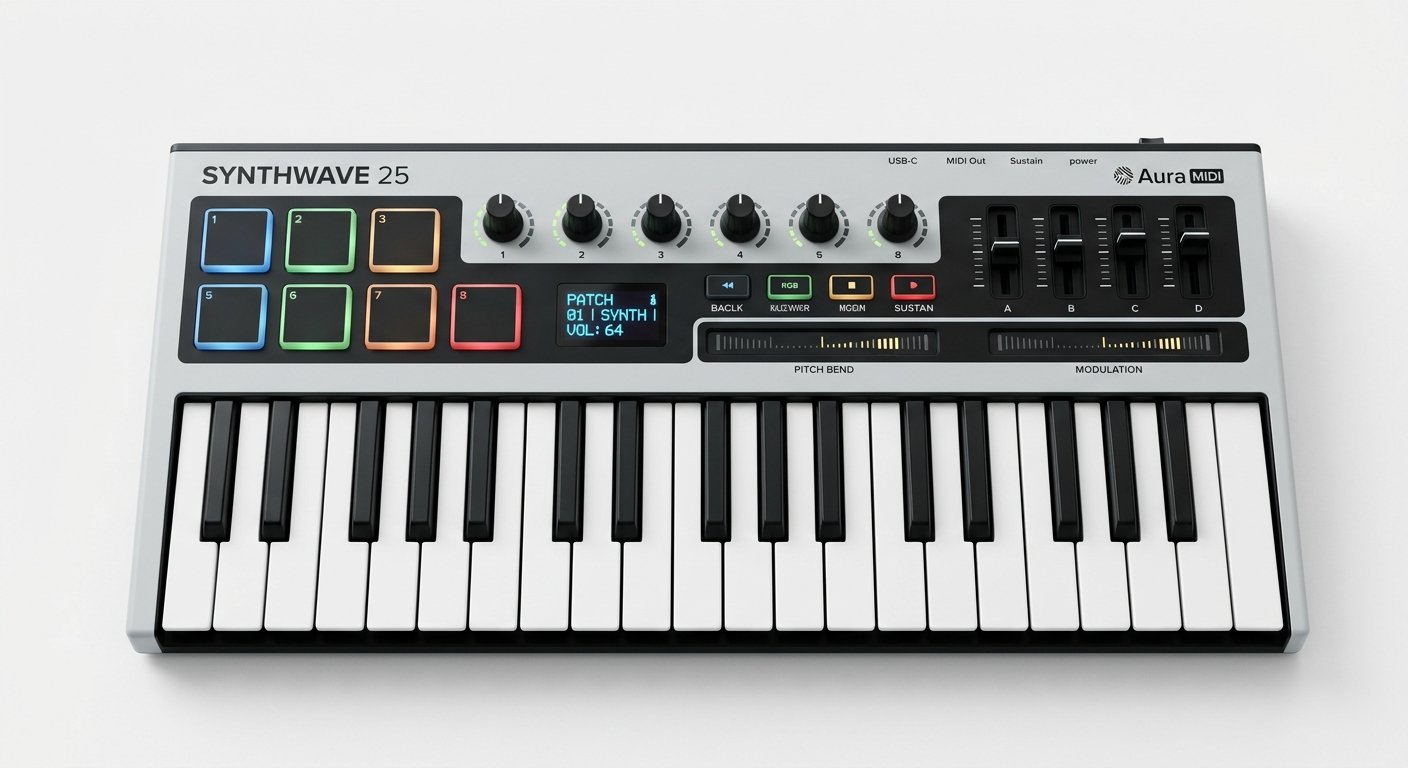
Buy the Arturia MiniLab 3 if you play synths, mix hands-on, or own outboard hardware. Those 4 faders and 8 encoders, the DIN MIDI out, the more playable slim keys, and the Analog Lab library make it the better all-round studio tool. It’s the choice for producers who tweak parameters constantly and want their controller to be a mixing surface as well as a keyboard.
Arturia MiniLab 3
25 slim keys, 8 pads, 8 encoders, 4 faders, and a DIN MIDI out, plus the Analog Lab software: the best for hands-on control.
Check Price on Amazon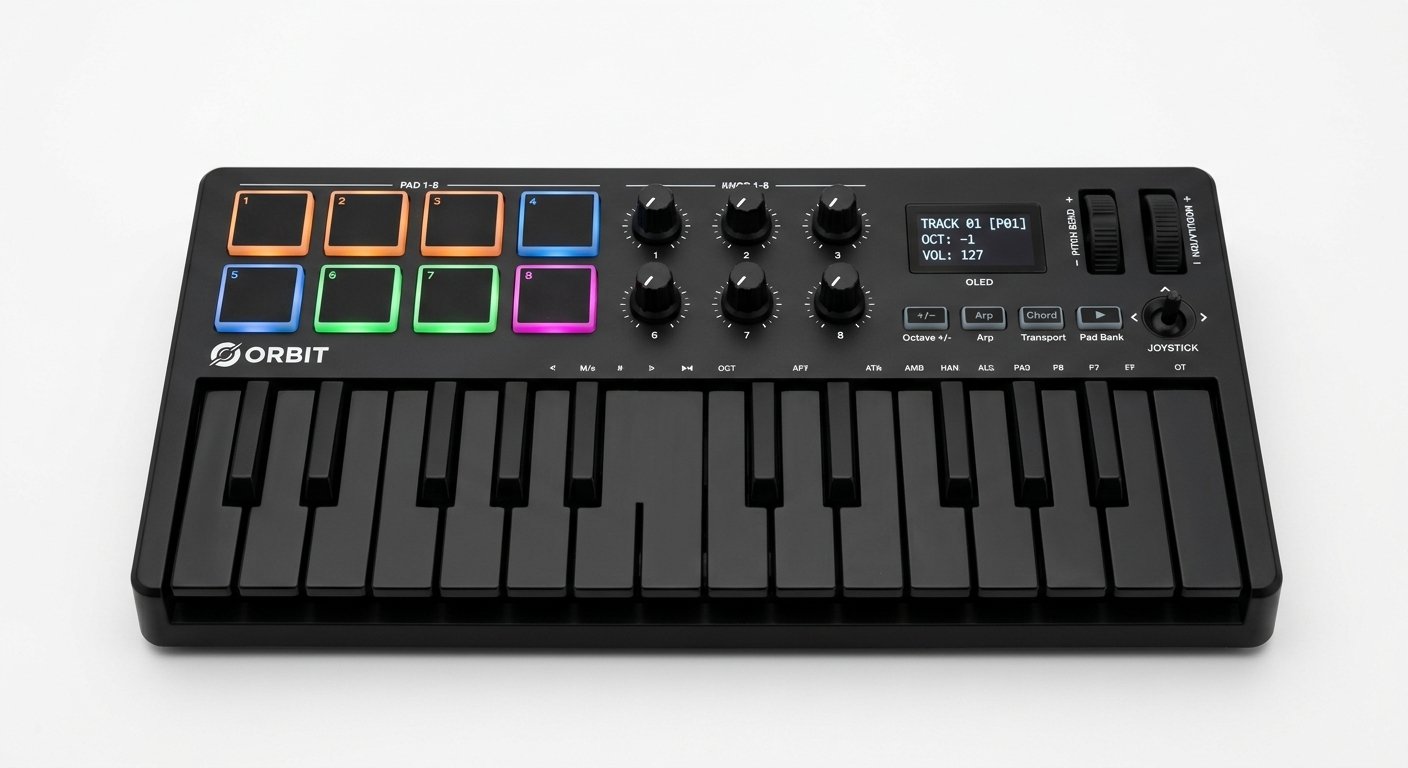
Buy the Akai MPK Mini MK4 if you make beats. Its superior MPC pads (with Note Repeat and Full Level) and the new real pitch and mod wheels make it the better choice for finger drumming, sample triggering, and beat-focused production. It’s also $10 cheaper and comes with a full beatmaking DAW.
Akai MPK Mini MK4
The best MPC-style pads in this class plus new pitch and mod wheels and MPC Beats: the best compact controller for beats.
Check Price on AmazonReal-World Use Cases
Specs only get you so far. Here’s how the choice plays out in practice:
You make hip-hop or trap beats. Get the MPK Mini MK4. You will live on those pads, and Note Repeat alone justifies the pick.
You write synth-led electronic music. Get the MiniLab 3. Analog Lab plus 8 encoders and 4 faders means you can sound-design without ever touching a mouse.
You’re a singer-songwriter sketching ideas. Get the MiniLab 3. The slim keys are more comfortable for playing chord progressions, and the software gives you usable piano and keys sounds immediately.
You own a hardware synth or groovebox. Get the MiniLab 3. The DIN MIDI out is the deciding factor; the MPK Mini simply cannot do this.
You have no DAW yet and a tight budget. Get the MPK Mini MK4. It’s cheaper and MPC Beats gets you producing without another purchase.
You mix in the box a lot. Get the MiniLab 3. Four faders change how mixing feels.
Should You Consider Anything Else?
These two dominate the compact category, but they aren’t the only options. If your DAW is Ableton Live, the Novation Launchkey Mini MK4 (~$119) gives you native clip and mixer control that neither of these can match. If you’re in FL Studio, the FL Studio-specific Novation FLkey Mini (~$109) does the same for the Channel Rack and Mixer. And if your budget is truly tight, the Akai LPK25 MK2 (~$59) gets you real velocity-sensitive keys, though you lose the pads and knobs entirely.
For a full breakdown of every option at this size, see our best 25-key MIDI controller roundup.
The Verdict
Both are excellent, and you genuinely won’t go wrong with either, this is a comparison between two of the best-value products in music tech.
The MiniLab 3 is the better all-rounder. Four faders, eight encoders, a DIN MIDI output, more playable slim keys, and the outstanding Analog Lab library make it the stronger studio tool for synth players, mixers, and anyone with hardware.
The MPK Mini MK4 is the better beatmaker. The best pads in its class, Note Repeat and Full Level, and, finally, real pitch and mod wheels make it the obvious pick if drums drive your workflow. It’s also cheaper and includes a full DAW.
Decide based on how you actually make music, not on the spec sheet: knobs and faders for synths, pads for beats. Whichever you pick, at around $100 it’s the best money you’ll spend on your setup.
Frequently Asked Questions
Is the Arturia MiniLab 3 better than the Akai MPK Mini?
Which has better pads, MiniLab 3 or MPK Mini?
Does the Akai MPK Mini have faders?
Which is better for beginners, MiniLab 3 or MPK Mini?
Does the Arturia MiniLab 3 have a MIDI output?
Are the MiniLab 3 keys better than the MPK Mini keys?
Which software bundle is better, Analog Lab or MPC Beats?
Complete Your Setup
Whichever you choose, see our full guide to the best MIDI controllers and our best 25-key MIDI controller roundup for more options, and pair your new controller with the right audio interface and studio monitors. If you’re building from scratch, our home studio setup for beginners guide covers the whole chain.