- Making AI music is a 5-minute skill to start: sign up for Suno, describe your song, generate, refine.
- Use the prompt formula: genre + mood + instruments + vocals + tempo. Never use real artist names.
- Simple Mode is for learning; Custom Mode (lyrics + structure tags) is the biggest quality upgrade.
- Suno generates two versions per prompt — iteration is the workflow, don't expect a perfect one-prompt song.
- Process/master your track before distributing, or streaming platforms may reject it.
Making music used to mean years of training, expensive gear, and studio time. In 2026, you can create a complete song, vocals, lyrics, and production, from a single sentence. This guide walks a complete beginner through making their first AI song step by step. We’ll use Suno because it’s the most beginner-friendly generator, but the same workflow (prompt, generate, refine, extend, process) applies to Udio, Riffusion, and most other tools, so you can follow along whichever one you pick.
I’ve generated hundreds of tracks doing exactly this. Here’s the workflow that actually works, without the “prompt master” fluff, plus a set of copy-paste prompts you can drop straight into Suno.
AI music is a song created by a machine-learning model from a written text prompt. The producer describes a genre, mood, instrumentation, and vocal style, and the generator returns a finished track with composition, arrangement, production, and sung vocals in under two minutes.
Written by Alex Kim. Reviewed by Alex Kim, electronic producer who tests AI music generators and production software. Last updated 18 July 2026.
How We Tested This Workflow
This guide comes from generating hundreds of tracks across Suno, Udio, and Riffusion rather than from reading documentation. We tested prompt structures systematically, running the same song idea with vague wording and then with the genre-mood-instruments-vocals-tempo formula, to see which consistently produced usable results rather than which sounded good once by luck.
We also worked the full pipeline end to end, including the export and distribution steps, which is where beginners most often hit problems that the platforms themselves do not warn you about. Every prompt below has been run through Suno and produced a usable track. Pricing and platform behaviour were verified in July 2026.
What You Need to Make AI Music
Almost nothing. You need a web browser, a rough idea of the song you want, and a free account on an AI music generator. No instruments, no DAW, no music theory. For this guide we’ll use Suno, because it’s the fastest path from idea to finished, downloadable song for beginners. (If you’re weighing options, see our guide to the best AI music generators in 2026 and our Suno vs Udio comparison.)
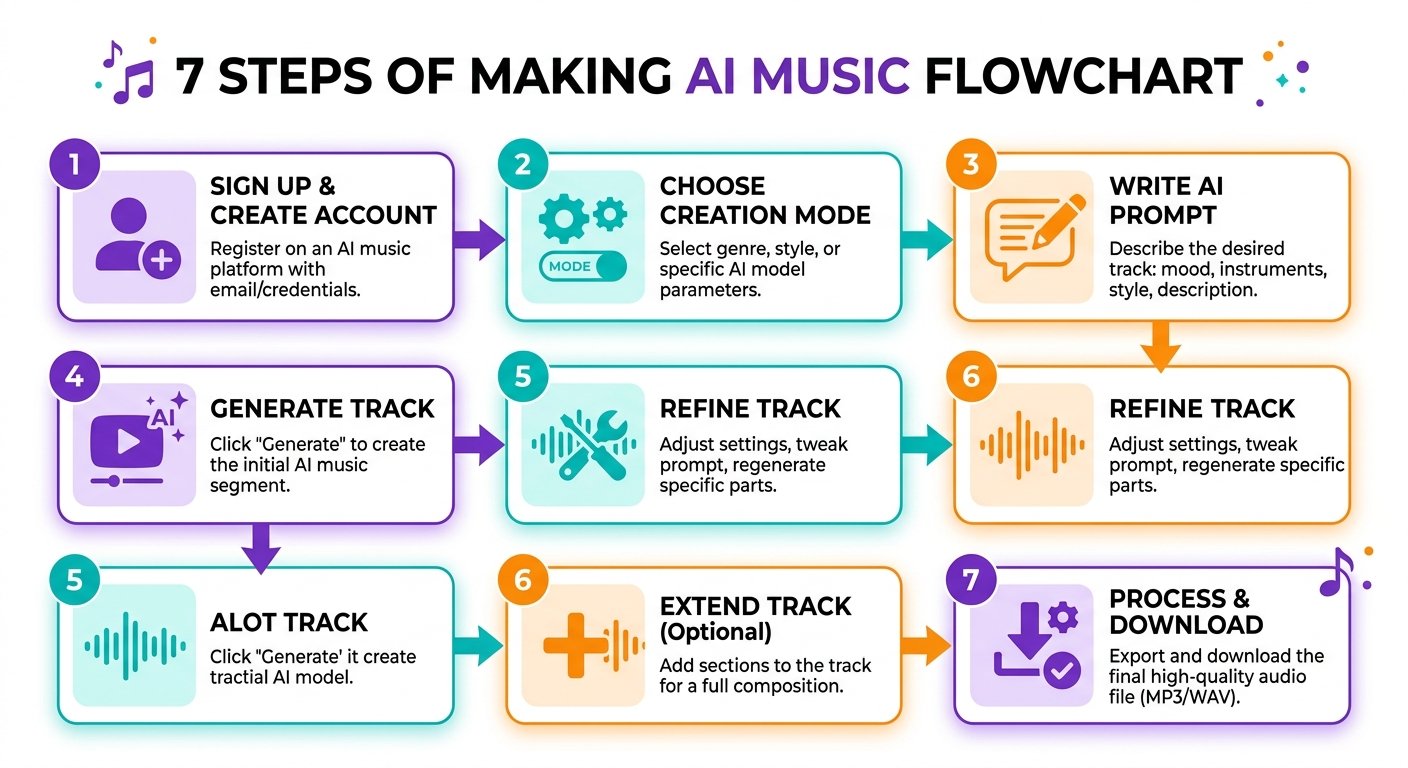
How to Make AI Music: Step by Step
Step 1: Create a free account
Go to suno.com and sign up. The free tier gives you daily credits, enough to learn and generate several songs a day. It’s personal-use only (no commercial rights), which is perfect while you’re learning. You only need a paid plan once you want to monetize or distribute.
Step 2: Open the Create tab and choose a mode
On the left sidebar, click Create. Suno has two modes, and picking the right one is the biggest early decision:
- Simple Mode gives you one description box (about 200 characters). You describe the song, Suno writes the lyrics and builds everything. Best for your first songs and learning how the model thinks.
- Custom Mode lets you write your own lyrics, use structure tags, and dial in style, tempo, and vocals precisely. This is the single biggest quality upgrade once you’re comfortable.
Start in Simple Mode.
Step 3: Write your first prompt (the formula)
This is where most beginners go wrong: they prompt Suno like a chatbot. Suno follows style patterns, not conversational instructions. The formula that works is genre + mood + instruments + vocals + tempo. For example:
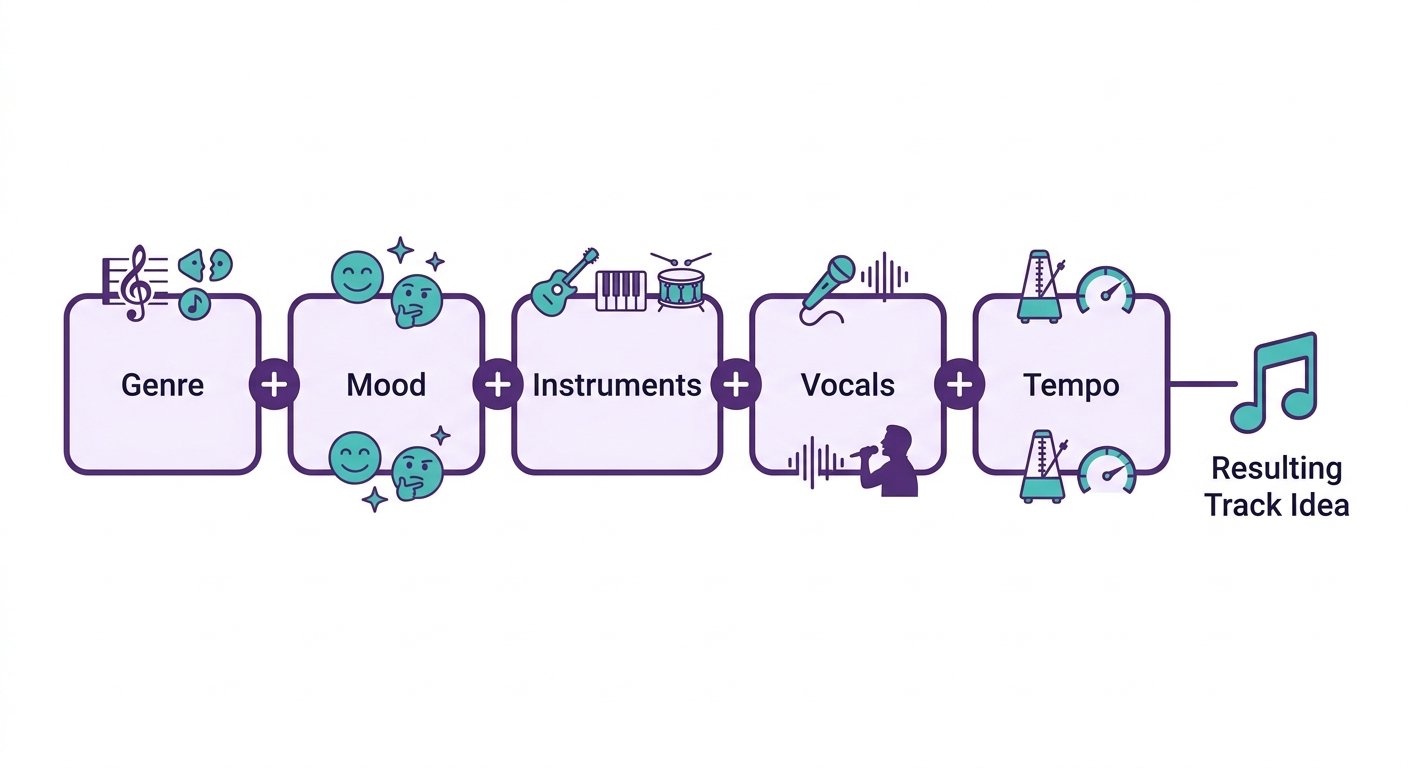
“Dance-pop track, bright synths, female vocals, catchy hook, 120 BPM, summer road-trip energy”
Be descriptive and layered, not vague. One important rule: you cannot use real artist or band names (Suno blocks them for copyright reasons). Instead, describe the characteristics of the sound you want. A handy trick is to ask ChatGPT or Claude to “describe [a style] as a comma-separated list of musical characteristics under 200 characters, no artist names,” then paste that into Suno.
Copy-Paste Suno Prompts (by Genre)
Here are ten tested prompts you can copy straight into Suno’s description box. Swap the mood or tempo to make them yours, and remember: never add a real artist’s name.
Pop and Dance
- Upbeat pop: Bright dance-pop, punchy four-on-the-floor beat, female vocals, big catchy chorus, glossy synths, 120 BPM, feel-good summer energy
- Sad pop ballad: Emotional pop ballad, soft piano, male vocals, swelling strings in the chorus, heartbreak mood, slow 70 BPM
Hip-Hop and Trap
- Trap beat: Modern trap, heavy 808 bass, crisp hi-hats, dark atmospheric pads, autotuned male vocals, moody night-drive vibe, 140 BPM
- Lo-fi hip-hop: Chill lo-fi hip-hop, dusty vinyl crackle, mellow jazz piano, soft boom-bap drums, no vocals, relaxed study mood, 85 BPM
Rock and Acoustic
- Indie rock: Energetic indie rock, jangly electric guitars, driving drums, male vocals, anthemic chorus, warm nostalgic tone, 128 BPM
- Acoustic folk: Intimate acoustic folk, fingerpicked guitar, soft female vocals, gentle harmonies, storytelling lyrics, rainy-day mood, 75 BPM
Electronic and Cinematic
- EDM: Festival EDM, soaring synth lead, big drop, sidechained bass, euphoric build-up, energetic 128 BPM, stadium crowd energy
- Ambient: Calm ambient soundscape, warm evolving pads, subtle piano, no drums, no vocals, peaceful meditative mood, slow and spacious
- Cinematic: Epic cinematic trailer music, huge orchestral strings, pounding percussion, choir swells, heroic dramatic mood, building to a climax
R&B
- Smooth R&B: Silky modern R&B, smooth male falsetto, warm Rhodes keys, laid-back groove, subtle 808s, late-night romantic mood, 90 BPM
Step 4: Generate and compare
Click Create. Suno generates two variations of your idea, each a few minutes long, in 30 to 90 seconds. Listen to both and pick the stronger one. The AI often ignores one instruction (it might switch male vocals to female, for example), which is normal. Just regenerate until the voice and style land. Don’t try to “one-prompt” a perfect song, iteration is the workflow, not a failure.
Step 5: Refine in Custom Mode (optional but powerful)
Once you have something close, switch to Custom Mode to take control. Here you can paste your own lyrics and add structure tags to guide the arrangement. Paste lyrics formatted like this:
[Verse 1]
Your first verse lyrics here
[Pre-Chorus]
Building tension lines
[Chorus]
Your big hook here
[Verse 2]
Second verse lyrics
[Bridge]
The turn or breakdown
[Outro]
Closing lines
- [Intro], [Verse], [Pre-Chorus], [Chorus], [Bridge], [Outro] shape the song’s sections
- The Style field defines genre and instrumentation
- Sliders like Weirdness and Style Influence control how experimental or literal Suno is (50% is a balanced starting point)
Custom Mode is how you go from “fun demo” to “actually usable track.”
Step 6: Extend the song (if needed)
If your track is too short or cuts off, use the Extend feature to continue it. Keep extensions to a minimum, two or three at most, because quality degrades the more you chain them. When you get an extension you love, use “Get Whole Song” to lock it in as a fallback.
Step 7: Process, then download
Here’s the step most beginners skip, and it’s the one that matters most if you plan to distribute. Raw AI exports carry detection signatures that can get tracks rejected by distributors or pulled from streaming platforms after upload. Before sending anything to Spotify, DistroKid, or YouTube, run your track through proper mastering or an AI-detection cleanup, then download. In our testing this was the single most common reason first-time uploads got rejected. Process first, distribute second, every time. On a paid plan you can download the file with commercial rights; on the free tier it’s personal use only.
Beginner Tips for Better AI Music
A few things that separate average results from genuinely good ones:
- Be specific. “Sad song” is weak. “Melancholic indie folk, fingerpicked acoustic guitar, soft male vocals, rainy-day mood, 70 BPM” gives Suno something to work with.
- Like and dislike tracks. Hit dislike on duds to hide them and like on keepers, so your workspace stays clean.
- Use one idea per prompt. Don’t stuff three genres into one description; the model prioritizes genre consistency over everything else.
- Analyze your wins. When a generation sounds great, look at what was different about that prompt and reuse the pattern.
- Match your key and tempo when combining AI tracks with other audio, our free BPM tapper and song key finder make this quick.
What AI Music Is (and Isn’t) Good For
AI music shines for background music for videos, song demos and idea-testing, personalized gifts, social media audio, marketing jingles, and educational songs. It’s a fantastic starting point and, increasingly, a finishing tool. A LANDR survey of over 1,200 artists found that 87% have already used AI in at least one part of their music process, so this is now mainstream, not fringe.
Where it still falls short is fully professional studio releases without any human editing. For those, treat the AI output as a strong first draft, then layer in real production. The U.S. Copyright Office’s guidance on AI-generated works and human authorship is worth reading before you build a business around AI music.
Frequently Asked Questions
How do I make AI music for free?
What is the best AI music generator for beginners?
How do I write a good prompt for AI music?
Can I sell music I make with AI?
Why does my AI song get rejected from Spotify?
How long does it take to make an AI song?
The Bottom Line
Making AI music in 2026 is genuinely a five-minute skill to start and a deep one to master. Sign up for Suno, describe your song with the genre-mood-instruments-vocals formula, generate two versions, refine in Custom Mode, and process before you download. The only real mistake is trying to nail it in one prompt, iteration is the whole game. Grab one of the copy-paste prompts above, start free, and you’ll have your first song today. Want to go deeper on which tool fits you? Compare the field in our best AI music generators guide.